• Home
  • About Us
  • Toolkit
  • Getting Finances Done
    • Hiring Advisors
    • Debt Management
    • Spending Plan
  • Insurance
    • Life Insurance
    • Health Insurance
    • Disability Insurance
    • Homeowners/Renters Insurance
  • Contact Us
  • Privacy Policy
  • Risk Tolerance Quiz

The Free Financial Advisor

You are here: Home / Archives for tech tips

8 Scam Messages That Look Official — But Aren’t

March 28, 2026 by Brandon Marcus Leave a Comment

8 Scam Messages That Look Official — But Aren’t

Image Source: Shutterstock.com

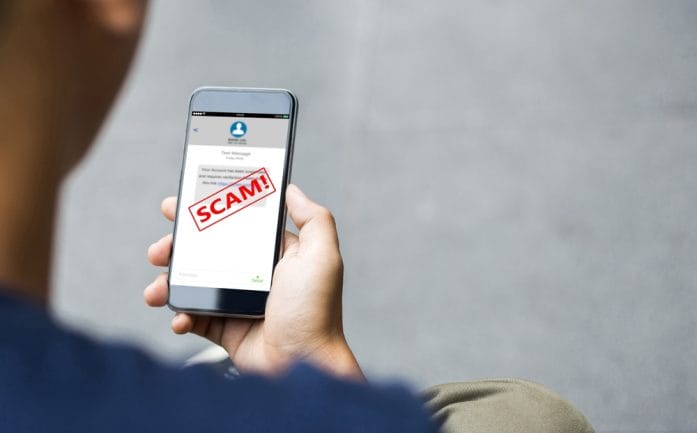
We have all been taught to stay on high alert for suspicious text messages that may be scams. Maybe it screams “urgent action required” or promises a reward that seems almost too good to be true. Those messages are often crafted to make your heart race and your fingers click before your brain even gets a chance to breathe. They look polished, they look real, and they look like something you absolutely must act on—but that’s exactly the point. Scammers rely on that split-second reaction to trick people out of money, personal info, or even both at once.

These messages don’t just lurk in spam folders. They invade your inbox, pop up as texts, or even slide into your social media DMs, perfectly dressed in the language of authority. A lot of them come cloaked as banks, delivery services, or even government notifications, making it nearly impossible to spot the danger at first glance. The catch? These messages are designed to pressure, confuse, and manipulate. If you want to outsmart the con artists, you need to know what you’re looking for.

1. The “Urgent Bank Alert” That Isn’t

Few things get attention faster than a banking emergency. Scammers know this, so they craft emails and texts that mimic your bank’s official tone, complete with logos and professional formatting. They might warn about suspicious activity, account freezes, or unauthorized purchases. The message will often demand immediate action, like clicking a link or calling a number, giving them the chance to steal login credentials instantly.

These fakes usually have tiny clues if you know where to look. Check the sender’s email or phone number—it often has extra letters or numbers that don’t match your bank. Links might look correct but redirect to entirely different websites. Real banks rarely ask for sensitive information through email or text. A solid defense is logging directly into your banking app or calling your bank using the official number, never the one in the suspicious message. That short pause can save you from a serious headache.

2. The “Package Delivery” Panic

Nothing spikes curiosity like a delivery notification, especially if you weren’t expecting a package. These scams mimic carriers like FedEx, UPS, or USPS, claiming your shipment can’t be delivered or requires urgent confirmation. The messages often include links or attachments, supposedly to “reschedule” or “verify” delivery. Clicking can install malware or steal personal information faster than a blink.

The scam usually leans on fear of missing out: missed deliveries, fines, or unexpected fees create instant pressure. Look closely at the sender info and URL. Real carriers usually provide tracking numbers that can be verified on their official websites. Avoid links in messages unless you initiated a shipment. A quick check with the actual company can reveal whether the notice is legitimate, saving you from digital chaos.

3. The “Government Agency” Deception

Scammers love pretending to be government offices. Tax authorities, immigration offices, or social security departments can all be impersonated convincingly. The messages often threaten penalties, legal action, or fines unless you act immediately. Panic sets in, and people feel forced to comply, which is exactly what the fraudsters want.

These scams are designed to feel official, sometimes even quoting real laws or referencing public programs. Legitimate agencies rarely communicate serious matters through text or email without prior notice by mail. If you receive a message claiming you owe money or must take immediate action, verify it independently by calling the agency directly using information from their official website. Staying skeptical is the best way to protect yourself from a high-pressure trap.

4. The “Account Suspended” Hook

Platforms you use every day, like social media, email services, or streaming accounts, can become tools for scammers. They craft messages claiming your account is suspended, hacked, or needs immediate verification. Panic is the bait: people tend to click first and think later. The link usually leads to a fake login page, harvesting your username and password before you know what hit you.

One key giveaway is generic language like “Dear User” instead of your actual account name. Another is grammar mistakes or odd phrasing that real companies would never use. Always navigate directly to the official platform to check your account status. Multi-factor authentication is also a strong shield, adding another layer of protection against these sneaky attempts.

8 Scam Messages That Look Official — But Aren’t

Image Source: Unsplash.com

5. The “Prize Winner” Illusion

Everyone loves free stuff. Scammers exploit this by sending messages claiming you’ve won a prize, lottery, or sweepstakes. They demand personal info or a small payment to release winnings, turning excitement into a trap. The offer often feels too good to be true because it is.

Legitimate contests never ask for sensitive information upfront or require payment to claim a prize. Examine the email address carefully, and don’t click on flashy links promising jackpots. If curiosity strikes, search for the contest online to verify authenticity. These scams prey on hope, but a little patience and skepticism can prevent a lot of frustration.

6. The “Tech Support” Con Game

A sudden pop-up or call claiming your computer is infected with viruses or compromised can create instant fear. Scammers impersonate tech companies, urging you to download software, call a number, or provide remote access. Once granted, they can steal files, install malware, or demand ransom.

Real tech support never initiates contact without prior reason. If a message claims there’s a problem with your device, close the window, restart, and reach out to the company through official channels. Avoiding panic is critical—these scams thrive on creating a sense of immediate danger. A calm, methodical approach will keep both your device and your sanity intact.

7. The “Subscription Renewal” Trap

Fake renewal notices target subscriptions people actually use, like streaming services, software, or even gym memberships. Messages claim your payment failed or that your account will be canceled unless you click a link or update your info. The urgency triggers quick reactions, often before users think twice.

Check your account directly by logging in on the official website. Watch for typos, suspicious email addresses, or unusual URLs in the message. Legitimate services rarely ask for sensitive details via email. Staying cautious can prevent financial loss and keep scammers from hijacking recurring payments.

8. The “Friend in Trouble” Ploy

This one’s straight out of a soap opera: a message from someone claiming to be a friend or family member in urgent need, stranded or locked out, asking for money immediately. The panic and emotional appeal are designed to override rational thinking. Many fall for this because it tugs at empathy and trust simultaneously.

Confirm the story through separate communication channels, like calling the person directly or messaging them on a platform you know is safe. Scammers rely on split-second emotional reactions, so taking a moment to pause and verify can prevent heartbreak and financial loss. Always check before acting—if it seems suspicious, it probably is.

Time To Outsmart the Fakes

Scam messages don’t have to ruin your day or empty your wallet. Recognizing the patterns—urgency, unexpected requests, links that don’t match official websites, and emotional manipulation—can give you the edge. Always take a moment to verify, check official sources, and trust your instinct when something feels off. Protecting personal information and credentials is non-negotiable, and a little skepticism goes a long way.

Have a story about a scam you almost fell for or a clever trick to spot fakes? Share it in the comments because everyone could use a few more tactics in their toolkit for staying one step ahead of these digital hustlers.

You May Also Like…

7 New Scam Tactics That Look Real — And Are Still Fooling Americans

Is Your Neighborhood Being Targeted by Real Estate Scammers?

7 Ways Identity Scammers Copy Your Signature Remotely

Regulation Alert: 9 Proposed Rules Every Investor Should Watch in 2026

4 Moves to Make After a Job Loss in a Tech-Driven Market

Brandon Marcus
Brandon Marcus

Brandon Marcus is a writer who has been sharing the written word since a very young age. His interests include sports, history, pop culture, and so much more. When he isn’t writing, he spends his time jogging, drinking coffee, or attempting to read a long book he may never complete.

Filed Under: scams Tagged With: Consumer Protection, cyber security, email scams, fraud prevention, identity theft, Online Safety, phishing, safety online, scam alerts, tech tips, text scams

5 Phone Calls You Should Never Return — Even If They Sound Urgent

March 26, 2026 by Brandon Marcus Leave a Comment

5 Phone Calls You Should Never Return — Even If They Sound Urgent

Image Source: Pexels.com

The phone rings, and suddenly everything feels urgent. A missed call flashes on the screen with a warning tone in the voicemail or a number that looks oddly official, and the instinct kicks in to fix whatever problem might be brewing. That sense of urgency feels powerful, almost impossible to ignore, and it pushes people to act fast instead of thinking things through. Scammers count on that exact reaction, because speed and panic make people easier to manipulate. One quick callback can open the door to losing money, personal information, or even control of important accounts. That single moment of curiosity or concern can turn into a costly mistake that lingers far longer than the call itself.

Plenty of calls deserve attention, but some absolutely do not deserve a return call under any circumstances. The tricky part comes from how convincing these calls sound, because they often mimic real institutions, real emergencies, or real opportunities that feel too important to ignore. Modern scam tactics rely on technology that masks phone numbers, imitates voices, and creates believable scenarios that fool even careful people.

1. The “One-Ring” Trap That Hooks You Fast

A missed call that rings once and disappears might seem harmless, but it often signals a well-known scam designed to get a callback. Scammers use automated systems to dial thousands of numbers and hang up almost immediately, leaving behind a tempting mystery. That curiosity pushes people to return the call, especially when the number looks unfamiliar or international. Once someone calls back, the scam kicks into gear through premium-rate numbers that charge high fees per minute. These charges can pile up quickly without any clear warning, leaving a shocking phone bill behind. The scam works because it feels so simple and innocent, and that simplicity masks the financial damage it can cause. A quick callback turns into a costly mistake that feels completely avoidable in hindsight.

The best move here involves ignoring the urge to investigate and resisting the temptation to call back unknown numbers entirely. If a call truly matters, the caller will leave a detailed message with clear identification and a legitimate reason to respond. Searching the number online can also reveal whether others have reported it as suspicious or linked it to scams.

Phone carriers and apps now offer spam detection features, and enabling those tools adds another layer of protection. Staying cautious about unfamiliar international numbers also helps, especially when no clear connection exists to that location. A missed call might spark curiosity, but curiosity should never outweigh caution when money sits on the line.

2. The Fake “Government Emergency” That Demands Immediate Action

Some calls come packed with urgency, claiming that a government agency needs immediate attention or that a serious issue requires instant action. These calls often mention unpaid taxes, legal trouble, or benefits that face suspension, and they rely heavily on fear to push people into reacting quickly. The caller may sound authoritative, using official-sounding language and even spoofed phone numbers that appear legitimate at first glance. That combination of urgency and authority creates a powerful sense of pressure that makes people act without verifying the situation. Scammers know that fear short-circuits logic, and they lean into that emotional response to keep control of the conversation. A callback gives them exactly what they want: engagement and a chance to escalate the scam.

Real government agencies do not operate this way, and they do not demand immediate payment or personal information over the phone without prior official communication. Anyone receiving a message like this should avoid calling back directly and instead look up the agency’s official contact information independently. Calling a verified number ensures that any conversation happens with a legitimate representative instead of a scammer. Staying calm and refusing to rush into action makes a huge difference, because urgency often signals manipulation rather than reality. Keeping personal information private and never sharing sensitive details over unsolicited calls also blocks many common scam tactics. A moment of patience can prevent a situation from spiraling into something far more serious.

3. The “Bank Alert” That Isn’t From Your Bank

Few things grab attention faster than a message about suspicious activity on a bank account, and scammers take full advantage of that reaction. A voicemail or missed call might claim that unauthorized transactions occurred, urging a quick callback to secure the account. The message often sounds polished and professional, sometimes even including partial account details to appear more convincing. That sense of urgency pushes people to act immediately, especially when money feels at risk. Once the callback happens, scammers guide the conversation toward gathering login credentials, PINs, or verification codes. That information gives them direct access to accounts, turning a fake alert into a real financial problem.

Handling these situations requires a deliberate shift in approach, because calling back the number provided creates unnecessary risk. Instead, checking the account directly through an official app or website provides accurate information without involving a third party. Contacting the bank using a verified number printed on a card or official statement ensures a safe connection. Financial institutions already encourage this habit, and following it protects against many common scams. Staying skeptical about unsolicited alerts also helps, especially when the message pressures immediate action. A real bank prioritizes security and clarity, while a scammer prioritizes speed and confusion.

4. The “Prize or Package” Call That Sounds Too Good to Miss

Excitement can feel just as powerful as fear, and scammers know exactly how to tap into that energy. A missed call or voicemail might claim that a prize awaits or that a package requires confirmation before delivery. These calls often create a sense of urgency by suggesting that the opportunity will disappear without quick action. That pressure pushes people to call back, hoping to claim something valuable or resolve a delivery issue. Once the connection happens, scammers may ask for personal details, payment for fees, or verification information that leads to identity theft. The initial excitement quickly fades when the consequences start to unfold.

Staying grounded and questioning the legitimacy of unexpected offers helps prevent falling into this trap. Legitimate companies do not require payment or sensitive information just to claim a prize or receive a package. Checking tracking numbers directly through official shipping websites provides accurate updates without relying on unknown callers. Ignoring unsolicited prize notifications also removes the temptation to engage with potential scams.

5. The “Tech Support Panic” Call That Creates Chaos

Technology issues can feel overwhelming, and scammers exploit that confusion with fake tech support calls. A voicemail or missed call might claim that a device has been compromised or that immediate action is needed to prevent damage. The message often includes alarming language that suggests viruses, hacking attempts, or data breaches. That sense of panic pushes people to call back quickly, hoping to fix the problem before it gets worse. Once connected, scammers may request remote access to devices or ask for payment to resolve the issue. That access gives them control over personal files, accounts, and sensitive information, turning a fake problem into a real one.

Avoiding these scams requires a clear understanding of how legitimate tech companies operate. Reputable companies do not initiate unsolicited calls about device issues, and they do not request remote access without a verified support request. Running antivirus software and keeping systems updated provides real protection without relying on unknown callers. Seeking help directly through official support channels ensures that any assistance comes from trusted sources.

5 Phone Calls You Should Never Return — Even If They Sound Urgent

Image Source: Unsplash.com

Let Suspicion Win Every Time

Every one of these calls shares a common thread: urgency designed to override good judgment. That urgency might come from fear, excitement, or confusion, but it always pushes for quick action without verification. Slowing down and questioning the situation creates a powerful defense against scams that rely on emotional reactions. Ignoring suspicious calls and refusing to return unknown numbers removes the opportunity for scammers to gain a foothold. Technology continues to evolve, and scammers adapt quickly, but a cautious mindset remains one of the strongest protections available. Taking control of how and when to respond keeps personal information and finances secure.

What strategies work best for handling suspicious calls, and which types of messages raise the biggest red flags? Share your thoughts, experiences, or tips in the comments and keep the conversation going.

You May Also Like…

7 New Scam Tactics That Look Real — And Are Still Fooling Americans

Is Quality Furniture Officially a Scam? Why Filling a New Home in 2026 is Destroying Senior Nest Eggs

8 Subtle Illusions Used by Scammers in Investment Offers

6 Elder Scams That Began Over the Phone Earlier This Year

10 Quiet Retirement Scams Targeting Women Who Just Got Divorced

Brandon Marcus
Brandon Marcus

Brandon Marcus is a writer who has been sharing the written word since a very young age. His interests include sports, history, pop culture, and so much more. When he isn’t writing, he spends his time jogging, drinking coffee, or attempting to read a long book he may never complete.

Filed Under: scams Tagged With: consumer safety, cybersecurity, fraud prevention, identity theft, personal finance safety, phishing, phone safety, phone scams, robocalls, scam awareness, scam calls, tech tips

How Safe Is It to Link All Your Devices to a Single Email Account?

August 1, 2025 by Travis Campbell Leave a Comment

email

Image Source: pexels.com

Staying connected is easier than ever. You can check your email on your phone, tablet, laptop, and even your smart TV. Many people link all their devices to a single email account. It feels simple. You get your messages everywhere. But is it safe? What happens if someone gets into that account? Email account security is more important than most people realize. If you use one email for everything, you need to know the risks and how to protect yourself.

1. Convenience Comes with a Price

Linking all your devices to one email account makes life easier. You get instant notifications. You can reset passwords quickly. You don’t have to remember which device has what. But this convenience can be risky. If someone hacks your email, they can access every device connected to it. They might see your contacts, messages, and even your location. Email account security is not just about your inbox. It’s about your whole digital life. If you use one email for everything, you’re putting a lot of trust in that one account.

2. One Breach, Many Problems

If your email account gets hacked, the damage can spread fast. Hackers can reset passwords for your bank, social media, and shopping accounts. They can lock you out of your devices. They might even use your email to scam your friends or family. The more devices you link, the more doors you open. Email account security means thinking about what could happen if someone else gets in. It’s not just about losing access. It’s about losing control over your digital identity.

3. Two-Factor Authentication Isn’t Foolproof

Many people use two-factor authentication (2FA) to protect their email. It’s a good step. But it’s not perfect. If all your devices are linked to the same email, a hacker who gets in might also get your 2FA codes. For example, if you use your email to get 2FA codes for other accounts, and someone hacks your email, they can get those codes too. This makes email account security even more important. Don’t rely on 2FA alone. Use different methods, like an authenticator app or a physical security key, for extra protection.

4. Privacy Risks Multiply

Your email account holds a lot of personal information. It might have receipts, travel plans, medical info, and private conversations. When you link all your devices, you’re spreading that information across more places. If one device gets lost or stolen, someone could use it to get into your email. And if your email is hacked, every device becomes a risk. Email account security is about more than just passwords. It’s about keeping your private life private. Think about what’s in your inbox. Would you want a stranger to see it?

5. Syncing Can Lead to Data Leaks

When you sync your email across devices, you’re copying data everywhere. That means your messages, contacts, and files are stored on each device. If you sell or give away an old phone or laptop without wiping it, your email data could go with it. Even if you think you deleted everything, some data might stay behind. Email account security means making sure your data doesn’t end up in the wrong hands. Always wipe devices before getting rid of them. And check your account settings to see which devices are connected.

6. Phishing Attacks Get Easier

Phishing is when someone tries to trick you into giving up your password or other information. If all your devices are linked to one email, a successful phishing attack can be much worse. Hackers can send fake alerts to all your devices at once. You might see a message on your phone, then your laptop, then your tablet. It feels urgent, so you might act without thinking. Email account security means being careful with every message. Don’t click on links or download attachments from people you don’t know.

7. Recovery Can Be Complicated

If you lose access to your email, getting it back can be hard. If all your devices are linked, you might lose access to everything at once. Recovery steps often use your email to verify your identity. If you can’t get into your email, you might be locked out of your bank, social media, and more. Email account security means having backup options. Set up recovery emails or phone numbers. Write down important information and keep it somewhere safe. Don’t wait until you’re locked out to think about recovery.

8. Kids and Shared Devices Add Risk

If you share devices with family or kids, linking everything to one email can be risky. Kids might click on unsafe links or download bad apps. Shared devices can make it easier for someone to accidentally change settings or delete important messages. Email account security is harder when more people use the same devices. Set up separate accounts for each person when possible. Use parental controls and teach kids about online safety.

9. You Might Miss Security Alerts

Many services send security alerts to your email. If you get a lot of notifications on all your devices, it’s easy to miss something important. You might ignore a warning about a suspicious login or a password change. Email account security means paying attention to alerts. Set up filters or rules to highlight security messages. Check your account activity regularly. Don’t assume everything is fine just because you haven’t noticed a problem.

10. There Are Safer Ways to Stay Connected

You don’t have to link every device to the same email. Use different accounts for work, personal, and important services. Set up guest accounts on shared devices. Use strong, unique passwords for each account. Turn on security features like device tracking and remote wipe. Email account security is about making smart choices. You can stay connected without putting everything at risk.

Protecting Your Digital Life Starts with One Account

Linking all your devices to a single email account is easy, but it’s not always safe. Email account security should be a top priority. Take steps to protect your information, use strong passwords, and think before you link. Your email is the key to your digital life. Treat it with care.

Have you ever had a problem with email account security? Share your story or tips in the comments.

Read More

How to Spot a Phishing Email Before It Steals Your Bank Info

How Safe Is That “Password-Free” Login Feature Everyone’s Using?

Travis Campbell
Travis Campbell

Travis Campbell is a digital marketer/developer with over 10 years of experience and a writer for over 6 years. He holds a degree in E-commerce and likes to share life advice he’s learned over the years. Travis loves spending time on the golf course or at the gym when he’s not working.

Filed Under: safety Tagged With: account protection, cybersecurity, device safety, email security, online privacy, Personal Finance, tech tips

Old Tech You Still Use That Hackers Love

July 2, 2025 by Travis Campbell Leave a Comment

hacker

Image Source: pexels.com

We all have a few pieces of old tech lying around—maybe a dusty laptop, a classic flip phone, or even a printer that’s seen better days. While these devices might seem harmless or even nostalgic, they can actually be a goldmine for hackers. Why? Old tech often lacks the security features and updates that keep your personal information safe. Hackers know this and actively look for ways to exploit outdated gadgets. If you’re still using old tech, you could be putting your data, finances, and privacy at risk without even realizing it. Let’s break down the most common types of old tech hackers love and what you can do to protect yourself.

1. Routers and Modems from Years Ago

That router you got from your internet provider five or ten years ago might still work, but it’s a favorite target for hackers. Old tech like outdated routers often runs on firmware that hasn’t been updated in years, leaving them vulnerable to attacks. Hackers can exploit these weaknesses to access your home network, steal sensitive information, or even launch attacks on other devices. If your router doesn’t support the latest security protocols like WPA3, it’s time to upgrade. Always check for firmware updates, and consider replacing your router every few years to stay ahead of cybercriminals.

2. Unsupported Operating Systems

Still using a computer with Windows 7 or an old version of macOS? Hackers love old tech running unsupported operating systems because they no longer receive security patches. This means any vulnerabilities discovered after support ends are left wide open for exploitation. Even if you’re careful online, just being connected to the internet can put your device at risk. The best course of action is to upgrade to a supported operating system, or if your hardware can’t handle it, consider replacing the device. If you must use an outdated system, keep it offline and refrain from storing sensitive information on it.

3. Outdated Smartphones

Many people keep their old smartphones as backup devices or hand them down to family members. However, old tech like unsupported smartphones can be a hacker’s dream. Once manufacturers stop providing security updates, these devices become easy targets for malware, phishing, and data theft. Hackers can exploit outdated apps and operating systems to gain access to your contacts, messages, and even banking information. Always check if your phone is still receiving updates. If not, it’s time to recycle it responsibly and switch to a newer model.

4. Classic Printers and All-in-Ones

Printers might not seem like a big security risk, but old tech in the form of classic printers can be surprisingly vulnerable. Many older printers connect to your Wi-Fi network and store copies of documents you’ve printed or scanned. Hackers can exploit weak security settings to access your network or retrieve sensitive files. Make sure your printer’s firmware is up to date, and if it’s no longer supported, consider upgrading. Always wipe stored data before disposing of or selling an old printer.

5. USB Flash Drives and External Hard Drives

USB flash drives and external hard drives are convenient, but old tech like these can be risky if not handled properly. Malware can easily spread through infected drives, and lost or stolen devices can expose sensitive data. Hackers often use compromised USB drives to deliver ransomware or steal information. Always scan drives for malware before use, encrypt sensitive data, and avoid plugging unknown drives into your computer. When disposing of old drives, physically destroy them to ensure your data can’t be recovered.

6. Smart Home Devices with Outdated Firmware

Smart home devices—such as security cameras, smart plugs, and thermostats—are now ubiquitous. But old tech in the smart home world is a growing target for hackers. Devices with outdated firmware or weak default passwords can be hijacked and used to spy on you or launch attacks on other networks. Regularly check for firmware updates and change default passwords to something substantial and unique. If a device is no longer supported, it’s best to replace it with a newer, more secure model.

7. Old Email Accounts and Forgotten Logins

Many people have old email accounts or online logins they haven’t used in years. Hackers love this kind of old tech because these accounts often have weak passwords and no two-factor authentication. If a hacker gains access, they can use your old accounts to reset passwords, steal personal information, or launch phishing attacks. Regularly review your online accounts, close those you no longer use, and enable two-factor authentication wherever possible.

Staying Ahead of Hackers: Make Old Tech Work for You, Not Against You

Old tech doesn’t have to be a liability. By staying aware of the risks and taking simple steps—like updating firmware, replacing unsupported devices, and securing your accounts—you can keep hackers at bay. Don’t let nostalgia or convenience put your privacy and finances in jeopardy. Make it a habit to review your devices and digital habits annually. A little effort now can save you a lot of trouble down the road.

What’s the oldest piece of tech you still use, and have you ever worried about its security? Share your stories or tips in the comments!

Read More

The Definition of Irony (or Why You Should Know What You’re Doing)

Im Not An Expert On Everything

Travis Campbell
Travis Campbell

Travis Campbell is a digital marketer/developer with over 10 years of experience and a writer for over 6 years. He holds a degree in E-commerce and likes to share life advice he’s learned over the years. Travis loves spending time on the golf course or at the gym when he’s not working.

Filed Under: Auto & Tech Tagged With: cybersecurity, data protection, Digital Security, old technology, Online Safety, Personal Finance, tech tips

FOLLOW US

Search this site:

Recent Posts

  • Can My Savings Account Affect My Financial Aid? by Tamila McDonald
  • 12 Ways Gen X’s Views Clash with Millennials… by Tamila McDonald
  • What Advantages and Disadvantages Are There To… by Jacob Sensiba
  • 10 Tactics for Building an Emergency Fund from Scratch by Vanessa Bermudez
  • Call 911: Go To the Emergency Room Immediately If… by Stephen Kanaval
  • 7 Weird Things You Can Sell Online by Tamila McDonald
  • 10 Scary Facts About DriveTime by Tamila McDonald

Copyright © 2026 · News Pro Theme on Genesis Framework