• Home
  • About Us
  • Toolkit
  • Getting Finances Done
    • Hiring Advisors
    • Debt Management
    • Spending Plan
  • Insurance
    • Life Insurance
    • Health Insurance
    • Disability Insurance
    • Homeowners/Renters Insurance
  • Contact Us
  • Privacy Policy
  • Risk Tolerance Quiz

The Free Financial Advisor

You are here: Home / Archives for Verizon

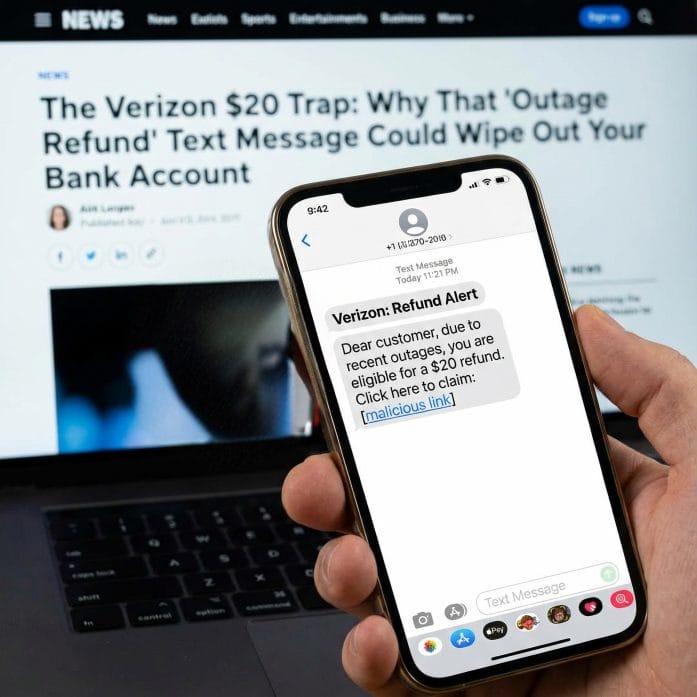
The Verizon $20 Trap: Why That ‘Outage Refund’ Text Message Could Wipe Out Your Bank Account

January 16, 2026 by Tamila McDonald Leave a Comment

Verizon Scam

At 10:20 PM ET on Wednesday night, Verizon finally plugged the leaks on a massive 10-hour software-driven blackout that left over 2 million Americans in “SOS mode.” Yesterday, the company issued an official apology and a promise: a $20.00 account credit for everyone affected.

But today, January 16, that promise of “free money” has turned into a digital landmine. Scammers have launched a massive, nationwide “smishing” (SMS phishing) campaign that is perfectly timed to exploit your wait for that $20 refund. If you click the wrong link today, you aren’t just losing your credit—you are handing over the keys to your entire financial life.

The ‘Perfect’ Scam: How They Are Hooking You

The danger lies in how Verizon decided to handle the rollout. In an official statement, Verizon News confirmed: “You will receive a text message when the credit is available.”

Hackers were waiting for exactly that sentence. This morning, thousands of Verizon customers reported receiving texts that look nearly identical to official carrier communications. They use the same corporate branding, professional tone, and—most importantly—they reference the “January 14 Outage” specifically.

The Trap: The text contains a link (e.g., https://www.google.com/search?q=vzw-relief-portal.com or verizon-claims-2026.net). When you click, you are taken to a mirror-image of the Verizon login page. Once you enter your username and password to “claim your $20,” the scammer has everything they need to bypass your security.

From a $20 Credit to a $0 Bank Balance

This isn’t just about stealing your Verizon login. Security experts are warning that this outage has become the ultimate catalyst for “SIM Swapping”—the most dangerous form of identity theft in 2026.

Once a scammer has your account credentials, they don’t just look at your bill. They initiate a SIM Swap. They convince an automated system or a customer service bot that you have a new device. Within seconds:

  1. Your Phone Goes Dead: You lose service immediately (thinking it’s just another outage).

  2. They Intercept Your Texts: Every 2-factor authentication (2FA) code from your bank, your 401(k) provider, and your Venmo now goes to the scammer’s phone.

  3. The Drain: They reset your bank passwords using the “Forgot Password” feature via SMS and drain your accounts before you even realize you’ve been hacked. In a world where your phone number is your identity, losing control of your SIM means losing control of your money.

The 3 Red Flags of a Verizon Scam Text

Verizon has stated they will notify you via text, but they will NEVER ask you to click a link to provide personal or financial data. Look for these “Audit Alarms”:

  • The Link: If the URL isn’t verizon.com or doesn’t direct you to open the app manually, it is 100% fake.

  • The Urgency: Scammers use phrases like “Claim within 2 hours or the offer expires.” Verizon’s actual credit is available for at least one full billing cycle.

  • The Information Request: If a site asks for your Social Security Number or a Credit Card to “verify your identity” for a credit, close the tab immediately.

How to Safely Claim Your $20 Today

If you want to ensure your $20 goes into your pocket and stay out of the hands of hackers, follow the “Manual Only” rule:

  1. Ignore the Text: Treat every incoming text as a scam, even if it looks real.

  2. Use the App: Open the MyVerizon App directly from your phone’s home screen.

  3. Check ‘Verizon Up’: Navigate to the “Rewards” or “Verizon Up” section. If you are eligible, the $20 credit will appear as a “Redeem” button inside the secure app environment.

  4. The Live Agent Hack: If you don’t see it, use the app’s chat and type “Live Agent” followed by “Request credit for Jan 14 outage.”

Small Win-Big Headache

Verizon’s $20 credit covers roughly 2–3 days of service, which is a small win for a big headache. But that small win isn’t worth a compromised bank account. We are seeing reports of “SIM Swapping” spikes in New York, Dallas, and Atlanta this morning—the exact cities hit hardest by the original outage.

Have you received a suspicious text message claiming to be from Verizon today? Tell us the phone number it came from and your city in the comments below so we can alert other readers in your area.

Read More:

The Verizon Kill Switch: Why Your Phone is Still in “SOS Mode” This Morning Despite the “Fix”

14 Outrageous Laws Still Legal in America — And Nobody’s Stopped Them

Tamila McDonald
Tamila McDonald

Tamila McDonald is a U.S. Army veteran with 20 years of service, including five years as a military financial advisor. After retiring from the Army, she spent eight years as an AFCPE-certified personal financial advisor for wounded warriors and their families. Now she writes about personal finance and benefits programs for numerous financial websites.
Filed Under: Online Safety, scams Tagged With: bank account, Scam, Verizon

The Verizon ‘Kill Switch’: Why Your Phone is Still in ‘SOS Mode’ This Morning Despite the ‘Fix’

January 15, 2026 by Latrice Perez Leave a Comment

Verizon outage fix

Image source: shutterstock.com

At 10:24 PM ET last night, Verizon executives officially declared the nationwide blackout “Resolved.” But for thousands of Americans waking up this morning, January 15, the digital nightmare isn’t over.

If you just picked up your phone to find the words “SOS” or “No Service” where your signal bars used to be, you aren’t crazy—and a simple restart might not be enough to fix it. While the “main pipes” of the network are back online, a “Data Ghost” is currently haunting millions of devices, effectively acting as a digital kill switch for users who haven’t performed a specific 2026 deep reset.

Based on Downdetector data and local reports as of 9:30 AM ET today (January 15, 2026):

  • Residual Outages: There are currently over 2,300 active reports of “No Service” or “SOS Mode” still lingering across the U.S. While this is down from the peak of 182,000+, it represents a “long tail” of customers who are still disconnected.
  • Hotspots: The “Ghost Service” (where the network says it’s fixed but phones aren’t connecting) is most prevalent in New York City, Atlanta, Chicago, Houston, and Dallas.

The ‘Ghost’ in the 2026 System

According to early reports from network engineers and the Federal Communications Commission (FCC), which has officially launched an investigation into the 10-hour disruption, the problem lies in “stale security tokens.”

When the network crashed yesterday, over 2 million iPhones and Androids “de-synced” from Verizon’s core security protocols. Even though the towers are broadcasting again, many phones are still holding onto a “dead” connection key, causing them to stay in SOS mode indefinitely.

How to Flip the ‘Kill Switch’ Back to ‘On’

If you are still seeing “SOS,” Verizon’s official advice is to “Restart your device.” However, for thousands of users in hubs like New York, Atlanta, and Chicago, a standard power-cycle is failing.

To force your phone to grab a new, valid security token from the restored network, you must perform a Network Reset.

  • For iPhone Users: Go to Settings > General > Transfer or Reset iPhone > Reset > Reset Network Settings.
  • For Android Users: Go to Settings > System > Reset Options > Reset Mobile Network Settings.
  • The Pro Tip: Turn off your Wi-Fi before you do this. It forces the phone to hunt for the Verizon 5G/LTE tower signal immediately upon rebooting.

The $20 ‘Inconvenience Credit’: How to Claim It

In an update released at 9:30 AM ET this morning, Verizon finally confirmed the compensation amount. The company is offering a $20.00 account credit to those affected. However, do not assume this will just show up on your bill.

To ensure your $20 credit is locked in:

  1. Log into the MyVerizon App.
  2. Look for the banner or notification to “Accept” the relief credit.
  3. If you don’t see the banner, open the Digital Assistant (Chat) and type: “Request Credit for January 14 Outage.” ### The Public Safety Fallout The stakes are higher than just a missed text. The FCC is investigating why the outage prevented 911 calls in several major cities—a direct violation of federal public safety requirements. In New York City and Washington D.C., emergency alerts were issued last night urging residents to use landlines or find a police station.

Did your service come back automatically, or are you still staring at the SOS icon? If you haven’t seen your $20 credit offer in the app yet, let us know your city in the comments below.

What to Read Next?…

  • How To Regularly Save Money At The Grocery Store
  • 8 Budget Line Items That Keep Growing Without Notice
  • Risk Proaction: 5 Steps to Stress-Test Your Finances for Worst-Case Scenarios
  • 7 Ways Credit Card Debt Builds Faster Than Expected
  • 6 Warning Signs That Your Credit Card Is A Problem
Latrice Perez

Latrice is a dedicated professional with a rich background in social work, complemented by an Associate Degree in the field. Her journey has been uniquely shaped by the rewarding experience of being a stay-at-home mom to her two children, aged 13 and 5. This role has not only been a testament to her commitment to family but has also provided her with invaluable life lessons and insights.

As a mother, Latrice has embraced the opportunity to educate her children on essential life skills, with a special focus on financial literacy, the nuances of life, and the importance of inner peace.

Filed Under: news Tagged With: 5G Down, FCC Investigation, Inconvenience Credit, mobile data, Network Reset, Security Token, SOS Mode, Tech News, Verizon, Verizon Outage

FOLLOW US

Search this site:

Recent Posts

  • Can My Savings Account Affect My Financial Aid? by Tamila McDonald
  • 12 Ways Gen X’s Views Clash with Millennials… by Tamila McDonald
  • What Advantages and Disadvantages Are There To… by Jacob Sensiba
  • Call 911: Go To the Emergency Room Immediately If… by Stephen Kanaval
  • 10 Tactics for Building an Emergency Fund from Scratch by Vanessa Bermudez
  • 7 Weird Things You Can Sell Online by Tamila McDonald
  • 10 Scary Facts About DriveTime by Tamila McDonald

Copyright © 2026 · News Pro Theme on Genesis Framework